American DJ Group of Companies Home Page    forums.americandj.com    Forums  Hop To Forum Categories  American DJ Lighting  Hop To Forums  MyDMX    I got my DMX Working on 64 BIT Vista
Go
New
Find
Notify
Tools
Reply
  
-star Rating Rate It!  Login/Join 
ADJ Lighting Mod
Enlightened DJ
Posted
Ok i did all this from a clean install of my dmx. It was not on my computer at all before i started.
so what i did was download the software from the link on the product page. here is a direct link to the software: http://www.americandj.com/pdff.../mydmx-march2009.zip

Then I downloaded the 64 bit drivers. found here: http://www.americandj.com/pdffiles/siudi_driver64.zip

Now before you launch the set up go into your c drive then go into your program files(X86) and create a folder named MyDMX. now launch your install and let it install my dmx software. Once it is done go to your c drive and program (X86) folder and look there for your my dmx folder and open it so you can see the contents. once you have it open take your my dmx 64 bit driver file you installed. (Second link i posted above) and open that folder and copy all those files into my dmx folder. It should prompt you about do you wish to install this driver. hit continue just like i am sure you did on the installation of my dmx. now once those files are there you will notice that if you try to run my dmx it does not do much of anything the software loads but you cannot do anything. Here's where it gets kinda tricky. Download the file Chris has up for us: http://www.studio42.com/mydmx/myDMX64bit.zip

Now with that file that you downloaded from Chris's servers open it and then open your my dmx folder. like so:
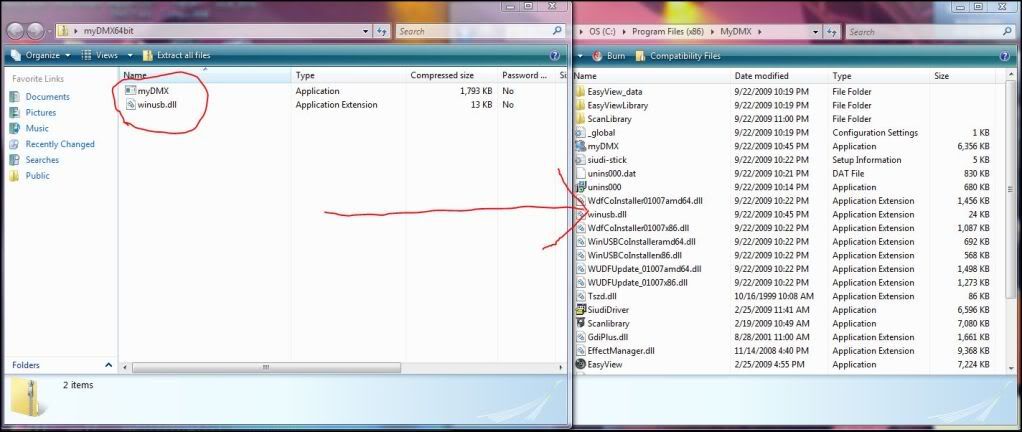
And move those files in the .zip folder to the my dmx folder as showin in the pic.

And once you are done your folder should look like this.
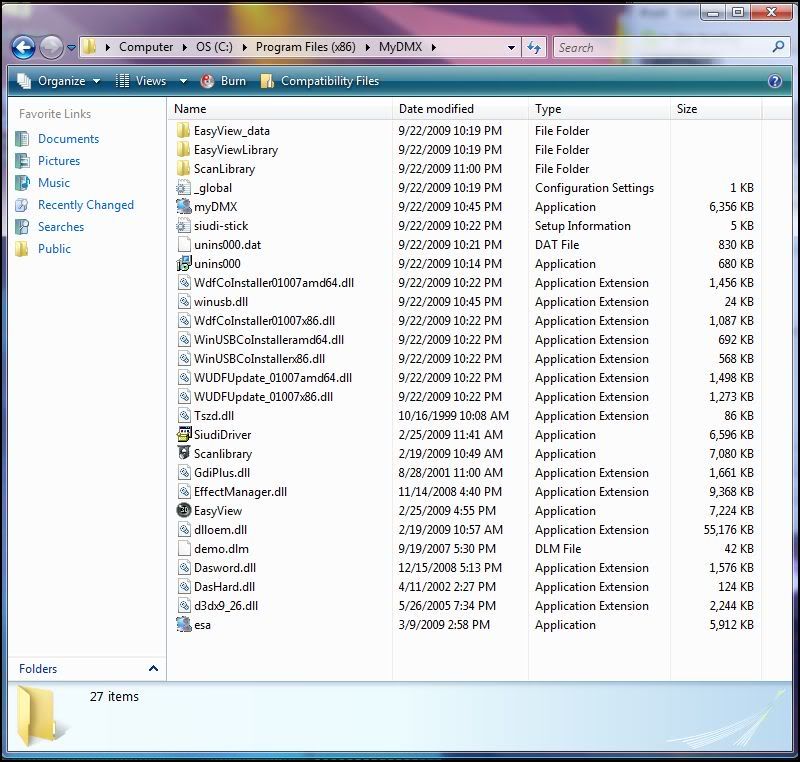

Now if you see that icon that says my dmx it is an application. shown here.
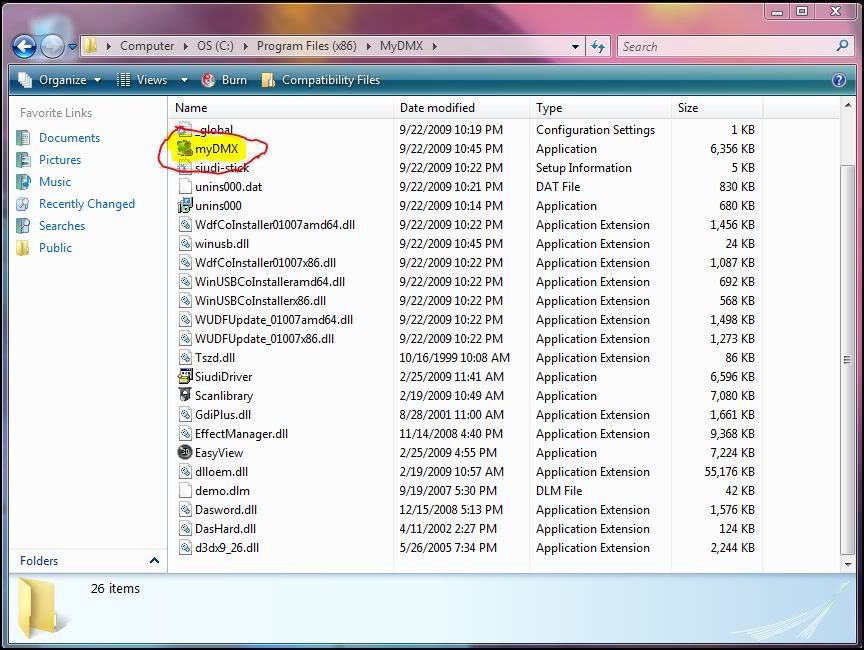
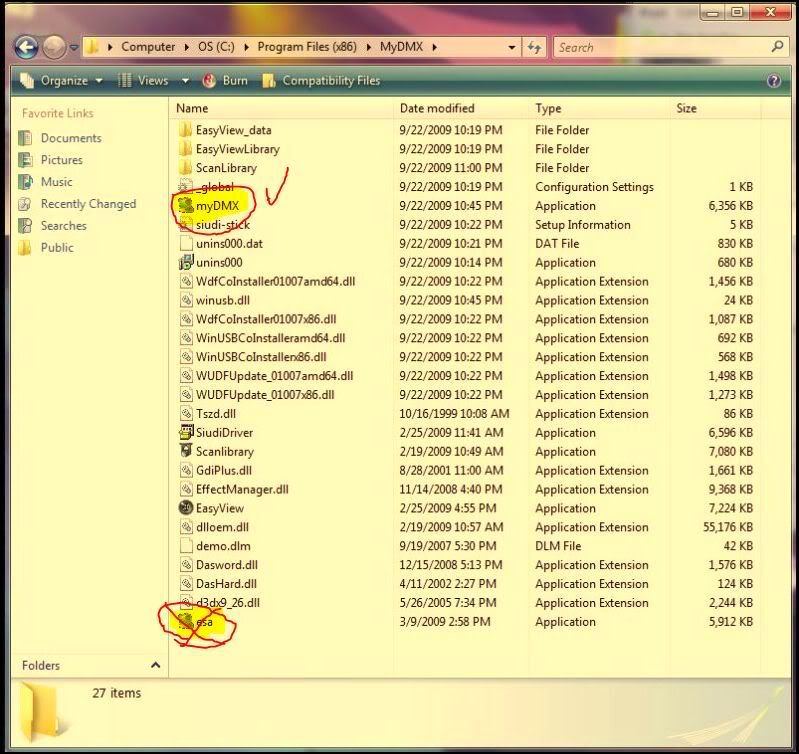
USE that icon as your desktop shortcut to launch the program. and you can delete the old ESa app icon that you USED to launch my dmx. shown here
After that close all the windows. It may help to restart your computer but thats up to you. Now you SHOULD Get my dmx to detect the interface and start adding profiles and getting DMX Output. It should not strobe like it has with some people. Any questions please do not hesitate to ask.
Sincerely,

P.S why that last Screen shot looks yellow i have no idea. haha


Photobucket
James D. Keeley
Elation Professional/ADJ Group of Companies
Compu Live/MY DMX Tech Support
Office Phone: 1-323-213-4590
Link To MY DMX Product page:
http://www.americandj.com/Prod...Category=DMXSoftware
 
Posts: 2309 | Location: Wausau,WI | Registered: 10 December 2005Reply With QuoteEdit or Delete MessageReport This Post
Bedroom DJ
Posted Hide Post
Works great!!! Thanks for the post.

Brent
 
Posts: 4 | Location: Collison, Illinois | Registered: 07 April 2009Reply With QuoteEdit or Delete MessageReport This Post
Enlightened DJ
Posted Hide Post
2 suggestions:

1: With some clean-up, this would make a good PDF for distribution.

2: Speaking of distribution, I think these files should be included in the MyDMX distribution currently downloadable. I think they should be kept sepparate within the ZIP archive so the optional install can occur as users see fit.

Either way, way to go on the new computer. I'm also sure countless people are now running MyDMX in 64-bit Vista now thanks to those docs.


--
Chris Pickett, Studio42 916-601-7089
http://www.studio42.com
Anti Spam Advocate: http://www.studio42.org
 
Posts: 1574 | Location: Elk Grove, California | Registered: 02 September 2003Reply With QuoteEdit or Delete MessageReport This Post
ADJ Lighting Mod
Enlightened DJ
Posted Hide Post
I agree. I am also thinking about uninstalling everything and recording a screen video and putting it on you tube. But i need a mic for this Pc first.
Sincerely,


Photobucket
James D. Keeley
Elation Professional/ADJ Group of Companies
Compu Live/MY DMX Tech Support
Office Phone: 1-323-213-4590
Link To MY DMX Product page:
http://www.americandj.com/Prod...Category=DMXSoftware
 
Posts: 2309 | Location: Wausau,WI | Registered: 10 December 2005Reply With QuoteEdit or Delete MessageReport This Post
Bedroom DJ
Posted Hide Post
A vid of the install would be dandy!

quote:
Originally posted by Jingles:
I agree. I am also thinking about uninstalling everything and recording a screen video and putting it on you tube. But i need a mic for this Pc first.
Sincerely,
 
Posts: 19 | Registered: 29 July 2009Reply With QuoteEdit or Delete MessageReport This Post
Bedroom DJ
Posted Hide Post
Could not get it to work on my machine until I wiped everything out. Failed both times I tried with the unextracted files still on my desktop. When uninstalled, deleted, and emptied the trash bin, it worked just fine.

Changed the MyDMX shortcut icon to take me to the other application link. That way I can still click on the MyDMX icon on my desktop. Only annoying thing is I have click that and then click run.
 
Posts: 7 | Registered: 21 March 2009Reply With QuoteEdit or Delete MessageReport This Post
  Powered by Eve Community  
 

American DJ Group of Companies Home Page    forums.americandj.com    Forums  Hop To Forum Categories  American DJ Lighting  Hop To Forums  MyDMX    I got my DMX Working on 64 BIT Vista

Copyright American DJ Los Angeles CA USA 2009